Independent Build - Productivity / AI Workflow
TypeNull
Rethinking how I interact with my computer
Case study details
Overview
I was working across multiple projects at the same time, constantly bouncing between Codex, Claude, browsers, notes, messages, and other applications.
Typing was becoming the bottleneck.
So I started leaning more heavily on the built-in dictation tools already available across macOS and different applications. That helped, but it created a different problem.
Every application handled dictation differently. My vocabulary, names, recurring phrases, punctuation, and writing style didn't carry with me from one place to another. I was still stopping to fix transcripts, correct names, remove filler, and clean up what I had just said.
I knew there had to be a better way.
I wanted one system that followed me everywhere.
Press a button. Talk naturally. Let it understand the way I speak. Clean up the obvious mess without rewriting me. Then put the finished text directly into whatever I was already working in.
That became TypeNull.
The Challenge
- Typing had become the bottleneck. I was working across several AI tools, browsers, notes, and communication apps at the same time, and manually typing everything was slowing down the actual work.
- Built-in dictation solved only part of the problem. Each application had its own dictation experience, with no shared vocabulary, corrections, snippets, or consistent cleanup behavior.
- Voice input still created cleanup work. Names, project terms, false starts, repeated words, and punctuation frequently needed manual correction after dictation.
- The workflow needed to stay inside the application already in use. Recording into a separate transcription window and copying the result back would simply replace one kind of friction with another.
The Approach
One Voice Layer Across macOS
I built TypeNull as a native Mac application with a global recording shortcut. It captures temporary microphone audio, transcribes it through Apple's Speech framework, optionally runs a narrow AI cleanup pass, and inserts the finished text back into the field I was already using.
Cleanup Without Rewriting
The AI layer is intentionally constrained to remove filler, repetition, false starts, and obvious punctuation issues while preserving the original language, tone, and meaning. Short, clean phrases can skip AI entirely.
Personal Dictionary and Snippets
I added a local dictionary for names, technical terms, and recurring corrections, plus reusable voice snippets that can be inserted with commands like "Insert my website." Both evolved directly from mistakes I encountered during everyday use.
Voice-Based Editing
I extended the same interface beyond initial dictation. Selected text can now be edited by voice using instructions like shortening a sentence, replacing a term, or changing tone, without opening another AI interface.
Failure Recovery Instead of Silent Failure
Real-world testing exposed long-dictation truncation, inconsistent macOS Accessibility behavior, and pastes that appeared successful without actually landing. TypeNull now accumulates full recognition results, verifies insertion where possible, and preserves recoverable text when success cannot be confirmed.
Local Usage Tracking
I also built a local dashboard to track words dictated, API tokens, estimated spend, daily usage, and monthly projections instead of guessing how heavily I was actually using it.
The Results
TypeNull went from a personal experiment to something I now use throughout the day.
By September 29, it had recorded 37,825 pasted words across 23 days, with 226,117 input tokens, 67,711 output tokens, and about $0.19 in estimated OpenAI usage.
In the most recent seven-day period alone, I dictated another 6,293 words, putting the current pace at roughly 47,000 words per month.
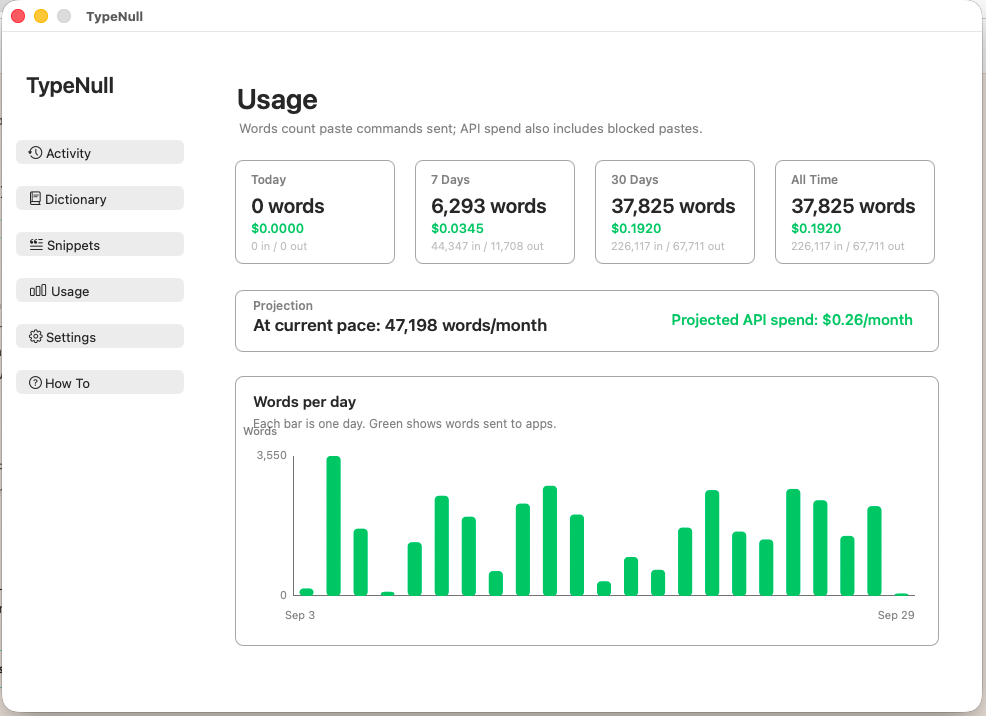
The cost was one of the biggest surprises. At this level of daily use, the AI cleanup portion is still projecting to only around $0.26 per month.
More importantly, the usage changed the product.
Real work exposed the need for a personal dictionary, reusable snippets, voice-based editing, paste recovery, and better handling of longer dictations. Those features weren't added because they sounded useful on a roadmap. They came from running into the same friction repeatedly while actually using TypeNull.
Then the Workflow Changed Again
Once TypeNull became reliable enough for everyday use, I realized many of the actions keeping me tied to the keyboard were simply hotkeys.
Recording. Editing. Deleting. Sending. Approving.
So I repurposed a Nintendo Switch controller and mapped its buttons to those actions.
That experiment is now changing the physical way I work. With a Bluetooth microphone and the repurposed controller, I can move around freely, dictate naturally, and control common actions without constantly returning to the keyboard or even staying tied to the desk.
That build deserves its own case study, so I'll break down the controller workflow separately.
See It In Action
The Takeaway
The useful insight wasn't simply that voice is faster than typing.
It was that once voice input became consistent across the tools I already use, the keyboard stopped needing to be the center of the workflow.
TypeNull started as a way to remove one bottleneck. Daily use turned it into a personalized input layer across my Mac, and that is now changing the way I interact with my computer altogether.